
ChatGPT business profile vs Google Business Profile: both are free listings you can claim and correct, but they aren’t equal yet. A Google Business Profile shows your business on Google Search and Maps. It’s open to storefronts and to businesses that travel to customers, and it comes with reviews, posts, calls and directions. A ChatGPT business profile is OpenAI’s new listing inside ChatGPT, which businesses have been able to claim in Business Hub since its beta launch on November 10, 2026. It has fewer features, and local stores and restaurants can only claim a listing ChatGPT already has.
So which comes first? For a local business, Google. Around29 Digital Media Solutions looked at three of the local businesses we manage. From August to October 2026, their Google Business Profiles brought 512 calls and 528 website clicks, while ChatGPT sent 19 visits to their websites.
Here’s how the two profiles compare, who can get each one today, and what to do first if you run a business in Tacoma, Puyallup or anywhere else in the US.
What is the difference between a ChatGPT business profile and a Google Business Profile?
A Google Business Profile is your listing on Google Search and Maps, with reviews, photos, posts and buttons to call or get directions. A ChatGPT business profile, sometimes called a ChatGPT business listing, is the page people see when they open your business from a ChatGPT answer. It holds fewer details.
Here’s the side-by-side view, based on Google’s and OpenAI’s help pages as of November 21, 2026:
| What you get | Google Business Profile | ChatGPT business profile |
| Who runs it | OpenAI, in beta since November 10, 2026 | |
| Cost | Free | Free to claim, and no Ads account needed |
| Where it shows | Google Search and Google Maps | ChatGPT answers and your profile page in ChatGPT |
| Who can get one | Businesses with a storefront, or that travel to customers | Eligible businesses; local stores and restaurants can only claim an existing US listing |
| How you verify | A method Google picks: phone or text, email, video or postcard | Phone, email, a DNS record or Shopify, then an ID check with Persona |
| What you can edit | Name, category, address or service area, hours, services, products, photos and more | Description, category, logo, cover photo, website, delivery and return policies, products |
| Reviews | Customers leave reviews, and you can reply | No review section |
| Posts and offers | Yes | No |
| Customer chat | Text or WhatsApp in select regions, plus an AI agent pilot for invited businesses | A Business Agent, only for US ecommerce and online service businesses |
| Insights | Views, search terms, calls, directions, website clicks, messages and bookings | Mentions, website clicks and discovery topics |
| Removing it | An owner can remove the profile | A published profile can’t be deleted |
| Team access | Owners and managers | The admin adds teammates and can give an agency access |
| Effect on visibility | Complete, verified profiles are more likely to show in local results | Claiming doesn’t guarantee more visibility |
Can a service-area business get a ChatGPT business profile?
Possibly, but check what it shows first. Google lets plumbers, cleaners and other businesses that travel to customers hide their address and show a service area instead. ChatGPT doesn’t seem to have that option yet.
Google’s rules are clear. Its guidelines allow a profile if your business “travels to customers where they are.” If you don’t serve customers at your address, Google tells you to remove it and list up to 20 service areas instead (Google Business Profile Help).
ChatGPT is less clear:
- OpenAI’s setup guide says “local stores and restaurants can currently claim only an existing U.S. listing.” It doesn’t mention service-area businesses at all.
- When you add a new business, Business Hub asks how customers interact with you. The “through a service” option has been marked “coming soon,” as developer Flavio Copes’s walkthrough shows.
- Rankability, which claimed its own profile, reports that its address showed with no option to hide it and no service-area setting. It’s a software company, and it notes that a local business may see different options.
That matters if you work from home. A plumber who hides a home address on Google may not be able to hide it in ChatGPT.
If you run a service business in Tacoma, Puyallup or elsewhere in Pierce County, here’s what to do:
- Search Business Hub for your business name, written the way it appears on your Google profile.
- If your listing shows up, check which address it displays before you claim it.
- If it shows your home address, contact OpenAI Support before you add more details. A published profile can’t be deleted.
- If you can’t find your business, don’t create a duplicate, which OpenAI’s policy forbids. Keep your Google, Bing and Yelp listings accurate and check back as access opens up.
How is verification different?
Google picks how you verify. ChatGPT lets you pick from the methods it offers, then adds an ID check.
Google. Verification methods “are automatically determined by Google and can’t be changed,” according to Google’s verification guide. Depending on your business, you may get a phone call or text, an email, a live video call, a video recording or a postcard, and most postcard codes arrive within 14 days. Some businesses need more than one method.
ChatGPT. You choose a method shown for your listing: a code by text, call or email, a DNS record (a setting your domain provider or web host manages), or a Shopify connection. After OpenAI approves the claim, the person managing the profile goes through an ID check with Persona, OpenAI’s verification partner. Until Persona approves it, you can’t publish changes, see insights or create an agent. The blue check also appears only after that approval, according to OpenAI’s setup guide.
When Around29 Digital Media Solutions claimed its own listing, the claim took about 36 minutes, most of it spent adding the DNS record. The ID check is a separate step, and Persona’s screen said status updates would come “over the next few days.”
A few tips from that process:
- Use your registered legal name in the ID check. OpenAI’s example is a shop called River Street Coffee that’s registered as River Street Foods LLC: enter the LLC name, and put the shop name in a trade-name field if there is one.
- Have the owner do the ID step, or someone authorized to represent the business. OpenAI may ask for a government ID, business registration details and proof that you’re authorized.
- Never send an ID or a tax number by email, even to your agency. Enter it yourself, or do it together on a call.
Our guide on how to claim your business in ChatGPT walks through every screen.
Who controls each profile, and can you delete it?
On Google, owners can add managers, transfer ownership and remove the profile. On ChatGPT, the person who claims the business controls who else gets access, and a published profile can’t be deleted.
Google. A Google Business Profile can have several owners and managers, each signing in with their own Google Account. Managers can edit details, reply to reviews and manage posts. Owners can also add or remove users, transfer primary ownership and remove the profile (Google Business Profile Help).
ChatGPT. The admin who claimed the business can add teammates and give an agency access, each using their own ChatGPT account. If someone else already claimed your business, you can dispute ownership from the profile’s menu and verify with Persona. OpenAI reviews every change before it goes live, and ChatGPT “may also use other sources” when it answers questions about you. Once a profile is published, OpenAI support can’t delete, unpublish or hide it. Only unpublished drafts can be deleted, and if you create a new profile through the Persona step, OpenAI’s approval publishes it automatically (OpenAI).
What this means for you: decide who claims before anyone starts. Use a company email that the business controls, not a staff member’s personal login or your agency’s account, so you don’t lose access when people leave.
What do customers see on each profile?
On Google, customers see your reviews, photos, posts and services, and they can call you or get directions in one tap. On ChatGPT, they see a shorter profile with your description, website and policies, and no reviews.
Google. Customers see your reviews and your replies, photos, posts and offers, services with prices, your hours, and buttons to call, get directions or visit your website. Verified profiles can add a text or WhatsApp chat option, and Google is inviting some businesses to try an AI agent that answers customer messages.
ChatGPT. The profile holds your description, category, logo, cover photo, website, and delivery and return policies, plus products if you connect a product feed. Eligible US ecommerce and online service businesses can add a Business Agent that answers questions about products and policies. It can’t take bookings or orders, so it links to your website instead.
There’s no review section in Business Hub, but that doesn’t mean reviews don’t count. In BrightLocal’s study of 1,365 locations, Yelp was the source ChatGPT used most when it answered questions about local businesses (BrightLocal, August 2026). So your reviews on Yelp and other sites still shape what ChatGPT says about you.
Which one brings more customers today?
Google, by a wide margin. For three of the local businesses we manage, Google Business Profile brought hundreds of calls and clicks in three months, while ChatGPT sent 19 website visits.
Around29 Digital Media Solutions compared Google Business Profile activity with ChatGPT visits for three of the local service businesses we manage: a dental practice, a garage door company and a junk removal company. Here’s what happened from August 1 to October 31, 2026:
- Google Business Profile: 512 calls, 528 website clicks and 734 direction requests. The junk removal company goes to its customers, so it had no direction requests.
- ChatGPT: 19 visits to their websites, measured in Google Analytics. That’s 0.4% of all their website visits.
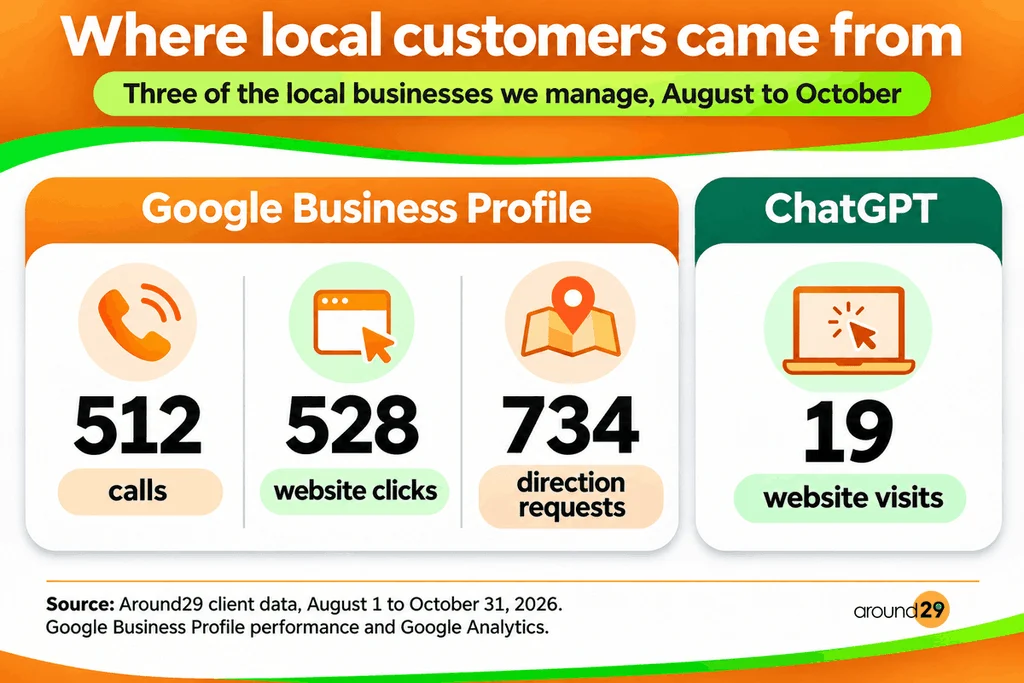
Google Business Profile calls, website clicks and direction requests compared with ChatGPT website visits for three of the local businesses we manage, August 1 to October 31, 2026.
Google Business Profile website clicks alone outnumbered ChatGPT visits by about 28 to 1, before counting a single call.
Three things to keep in mind:
- ChatGPT profiles couldn’t be claimed until November 10, so none of these businesses had one during this period.
- Some clicks from the ChatGPT app arrive without a source and show up in Google Analytics as direct visits.
- Google counts calls and clicks from Google Ads in these numbers, according to its performance help page.
ChatGPT is growing fast. OpenAI says 1.2 billion people use it every week (OpenAI). But in our data, the calls still come from Google.
What does each one tell you about your customers?
Google tells you who called, clicked and asked for directions. ChatGPT tells you how often it showed your business and how many people clicked through, but nothing about calls.
Google. The performance report shows how many people viewed your profile, the searches they used to find you, and how many called, asked for directions, clicked to your website, messaged or booked. You can choose the date range.
ChatGPT. Business Hub shows three things for the past 28 days:
- Mentions. For a local business, a mention counts every time ChatGPT shows your location in an answer, even if nobody clicks. Treat it like a view of your listing, not a lead.
- Website clicks. How often people clicked through to your website.
- Discovery topics. Themes in the answers that mentioned you. OpenAI never shares the actual questions or conversations.
Expect blanks at first. A number only appears once activity passes OpenAI’s reporting threshold, so a blank doesn’t mean zero. Our own dashboard also showed profile views and a 7-day view.
Neither one tells you about phone calls that started in ChatGPT. To compare the two each month, check:
- your Google Business Profile performance report
- Google Analytics, where visits from ChatGPT show in the AI Assistant channel with the source chatgpt.com
- Business Hub insights, once your ID check is approved
- new callers, by asking how they found you
Our ChatGPT claim guide has more on tracking ChatGPT leads that come in by phone.
Does your Google Business Profile help you show up in ChatGPT?
Not directly, as far as OpenAI has said. It does help you show up in Google’s own AI answers.
OpenAI hasn’t said that ChatGPT uses Google Business Profile. Its search help page says ChatGPT may share your location with “trusted third-party providers” for local information “such as nearby business listings,” and that ChatGPT search sometimes works with other search providers. For restaurant reservations, it names OpenTable, Resy and Yelp.
The same BrightLocal study points that way too. Google’s AI Overviews and AI Mode used Google Business Profile for almost every location, while ChatGPT used Yelp more than any other source (BrightLocal, August 2026).
Claiming your ChatGPT profile won’t push you up either. OpenAI says claiming “doesn’t guarantee increased visibility,” and that advertising doesn’t influence ChatGPT’s independent answers (OpenAI). On Google, local results are based mainly on relevance, distance and how well known a business is, and there’s no way to pay for a better local ranking (Google).
What helps with both is the same information everywhere. Keep your business name, address or service area, phone number and hours identical on your website, Google Business Profile, Bing Places, Apple Business Connect and Yelp. Our Google Business Profile optimization checklist and Bing Places setup guide walk through those two listings, and how to get ChatGPT to recommend your business covers what else ChatGPT looks at. For why a top Google ranking doesn’t always carry over to ChatGPT, see GEO vs SEO.
Do you need a ChatGPT business profile if you already have a Google one?
Yes, if ChatGPT already has a listing for you, but set up Google first. Do it in this order:
- Verify and complete your Google Business Profile. In our data, that’s where the calls come from.
- Search Business Hub and claim your listing if it’s there. Check the address it shows before you claim.
- Decide who owns each login. Use a company email for both. Add your agency as a manager on Google, and give it access in Business Hub.
- Make your details match everywhere, from your website to every listing.
- Check both every month: Google’s performance report, Business Hub insights and the AI Assistant channel in Google Analytics.
What else do people ask about ChatGPT and Google business profiles?
Here are short answers to common questions about the two profiles.
Is it worth having a Google Business Profile?
Yes, for almost every local business. It’s free, and for the three businesses in our comparison it brought 512 calls, 528 website clicks and 734 direction requests in three months. Google also says an accurate Business Profile can help you show up in its AI answers.
Is a ChatGPT business profile free?
Yes. Claiming your business in ChatGPT costs nothing, and you don’t need an Ads account. Advertising in ChatGPT is a separate, paid product.
Does ChatGPT offer a business account?
Yes, but that’s a different product. ChatGPT Business, which used to be called ChatGPT Team, is OpenAI’s paid workspace plan for teams. A ChatGPT business profile is a free listing you claim in Business Hub, and you don’t need a paid plan to claim one.
Is ChatGPT replacing Google Business Profile?
No. ChatGPT’s profile is new, has fewer features and isn’t open to every local business yet. For the three businesses in our comparison, Google brought almost all the calls and clicks. Treat ChatGPT as an extra listing to keep accurate, not a replacement.
Is it still called Google Business Profile?
Yes. Google renamed Google My Business to Google Business Profile in 2021, and its help pages still use that name. Many people still call it GMB or Google My Business.
Do you need an LLC to have a Google business page?
No. Google’s rules are about how you serve customers: your business needs a location customers can visit, or it needs to travel to them. Google even asks you to leave legal terms like LLC out of your profile name unless your signage uses them. ChatGPT’s ID check works the other way and asks for the legal name on your registration documents.
Does ChatGPT show my Google reviews?
OpenAI hasn’t said it does. ChatGPT profiles have no review section, and BrightLocal found that Yelp was the source ChatGPT used most for local businesses. Ask happy customers for reviews on Google and on the other sites your customers use.
Can my marketing agency claim my ChatGPT profile for me?
Not on its own. The owner, or someone authorized to represent the business, should do the claim and the ID check. Once it’s approved, the admin can give the agency access in Business Hub.
Can someone else claim my business in ChatGPT?
OpenAI’s policy only allows people to manage businesses they represent. If someone else claims yours, you can dispute ownership from the profile’s menu and verify with Persona. Search Business Hub for your business now so you know where it stands.
Do I need a separate ChatGPT profile for each location?
Usually, yes. OpenAI says there’s no single parent profile that manages every brand or automatically claims its locations. Brands with many locations should ask their OpenAI account contact about the supported way to claim them.
Can I claim a ChatGPT business profile outside the US?
It depends on where you are and what kind of business you run. OpenAI says availability depends on the business’s location and type, and local stores and restaurants can currently claim only an existing US listing.
Want help with both profiles?
Around29 Digital Media Solutions handles Google Business Profile management and ChatGPT Business Profile setup and management for local businesses in Tacoma, Puyallup and across Pierce County. We check whether your ChatGPT listing can be claimed, guide you through verification, keep your details matching on both, and report on calls, clicks and mentions every month. Talk to us about your profiles.


