To claim your business in ChatGPT, sign in to ChatGPT, open Business Hub, search for your business and prove you represent it with your business phone, business email, a DNS record on your website’s domain or your Shopify store. OpenAI reviews the claim, then the person managing the listing passes an ID check with Persona before anything can be edited. That’s the process in OpenAI’s setup guide for Businesses in ChatGPT, a beta that OpenAI launched on November 10, 2026.
We claimed Around29 Digital Media Solutions the next day. The claim was approved about 36 minutes after we started, and most of that time went into adding a DNS record. The ID check that comes next takes longer. OpenAI doesn’t publish a review time, and early reports range from the same day to several days. One more thing before you start: OpenAI says claiming your business doesn’t make ChatGPT recommend it more often.
This guide walks through every screen we saw, what each verification method needs and what to do when it stalls. It then covers what you can do once you’re verified: edit your business details, add products, build an agent, invite your team and read the insights. Throughout, we point out what a plumber, dentist or garage door company in Pierce County can do today.
Key takeaways
Claiming is free to start, and you don’t need an Ads account or a ChatGPT Enterprise agreement.
Local stores and restaurants can only claim a listing that already exists in the US, for now.
The claim itself can take minutes. The Persona ID check can take days, and editing, insights and agents stay locked until it’s approved.
After verification, you edit your profile in five tabs (About, Location, Contact, Hours and Photos), and retailers can add a product feed.
Insights count mentions, profile views and website clicks. You never see individual chats.
Business Agents are limited to US ecommerce and online service businesses at launch.
What is ChatGPT Business Hub?
ChatGPT Business Hub is the dashboard where companies claim and manage how they appear in ChatGPT. It’s the center of Businesses in ChatGPT, a program OpenAI launched in beta on November 10, 2026, as a way to reach “the 1.2 billion people who use ChatGPT each week,” according to its launch announcement.
It has three parts:
Part
What it does
Who can use it today
Business Hub
The dashboard where you claim your business, edit its details and see insights
Eligible businesses where ChatGPT is available
Business profile
The page people see when they click your business in a ChatGPT answer
Any business ChatGPT shows, claimed or not
Business Agent
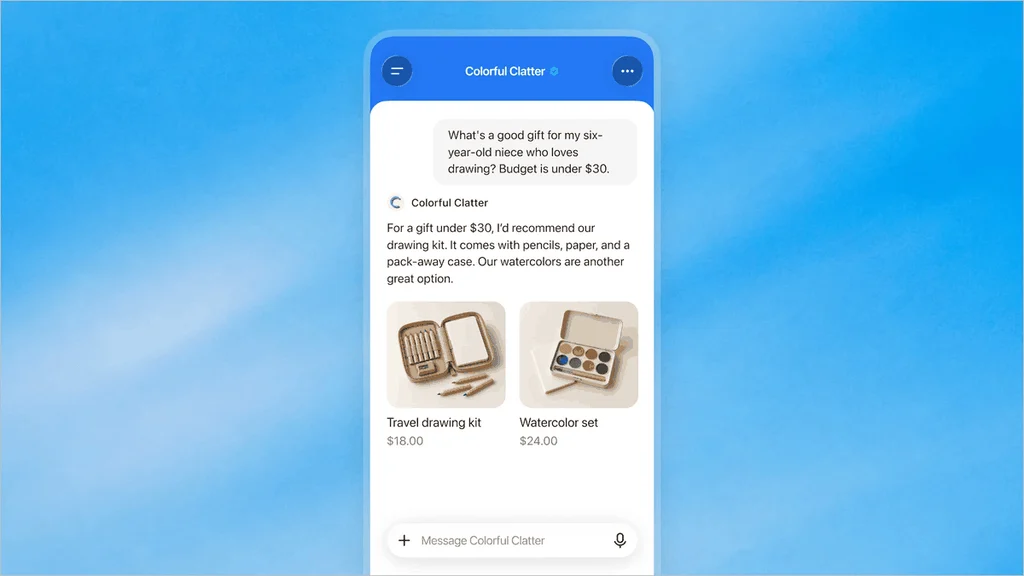
An optional chat assistant that answers questions about your offerings from information you provide
Eligible ecommerce and online service businesses in the US
Don’t confuse it with ChatGPT Business, OpenAI’s paid team subscription. Google mixes the two up. When we searched “how to add my business to ChatGPT” from a US location on November 11, 2026, most of the People also ask questions were about that subscription’s price and seats. OpenAI says you don’t need an Ads account or an Enterprise agreement to claim your business, and our dashboard offered the Business plan only as an optional upgrade.
Can a local business claim its ChatGPT profile yet?
You must own the business or be authorized to represent it.
Claiming is “initially available to eligible businesses with a website.”
Eligibility depends on your industry, location and OpenAI’s verification and integrity checks, and OpenAI may hold off on some categories until it has safeguards in place.
“Local stores and restaurants can currently claim only an existing U.S. listing.” Eligible online businesses may see an option to add a new one.
What Business Hub offers also depends on where you search from. On our first attempt, the search showed a different company with a similar name and offered only to create a new profile, which led to a “Join the waitlist” screen that said OpenAI is “gradually opening access to more businesses.” When we searched again from the US, where Around29 is based, our existing listing came up and we could claim it. So if Google’s AI Overview tells you to “click the plus (+) button” to add a missing business, expect that it may lead to a waitlist, and that it isn’t open to local stores yet.
Businesses that serve customers at their homes, such as plumbers, HVAC companies, roofers and garage door companies, are in a gray area. OpenAI’s policy expects an “address or service area” on profiles, but its setup guide only spells out the rules for stores and restaurants. When you add a new business, Business Hub asks how customers usually interact with you: at a physical location, through an online store or through a service. The service option has been marked “coming soon,” as developer Flavio Copes’s walkthrough of that step shows.
What should a Pierce County service business do first?
Search Business Hub for your business name. Try the name on your Google Business Profile and the name customers use.
If your listing comes up, claim it using the steps below.
If someone else already claimed it, open the profile, select the ••• menu and choose Dispute ownership. You’ll verify with Persona.
If you see Contact support, the listing is locked. Use that button to ask OpenAI for access.
If nothing comes up, don’t create a duplicate, which OpenAI’s policy forbids. Keep your website, Google Business Profile and Bing Places listing accurate, and check back as access opens up.
How do you claim your business in ChatGPT?
To claim a business on ChatGPT, follow these seven steps. They’re the ones we followed on November 11, 2026, with the screens we saw.
Step 1: Sign in with an account the business controls
Use a ChatGPT login that belongs to the business, such as one tied to a company email address, not an employee’s personal account. The person who claims the business becomes its admin and can add teammates or an agency later. OpenAI asks each person to use their own ChatGPT account, so nobody needs to share a password.
Step 2: Open Business Hub and search for your business
Business Hub is in the ChatGPT sidebar, or go straight to chatgpt.com/business-hub. Type your business name and check the address on each result before you pick one.
Business Hub’s search. Results can include other companies with similar names (blurred here), so check the details before you choose.
Step 3: Pick your listing and accept the terms
Select the listing that matches your business, confirm which account will manage it and accept the Businesses in ChatGPT Terms. Read the terms first. We cover the parts that matter for local businesses below.
The claim screen. The account email is blurred.
Step 4: Verify that you represent the business
Choose one of the verification methods Business Hub offers you. We verified with our website domain, which meant adding one TXT record in our DNS settings.
The DNS option. The host follows the pattern openai-business-claim.yourdomain.com. The value is unique to each claim, so ours is hidden.
Step 5: Wait for the claim review
OpenAI reviews the claim and emails you a decision or a request for more information. You can withdraw the claim while it’s under review. Ours was approved within a minute or two of selecting Verify domain.
The review screen. OpenAI emails the decision to the account holder.
Our approval screen. The preview card showed a blue check right away, and ChatGPT offered $500 in ChatGPT Ads credit.
A note on that blue check: OpenAI’s setup guide says “Claiming your business alone doesn’t give its profile a verified badge” and that the badge appears once your Persona check is approved, while its product page says a blue check shows a profile has been claimed. Our preview card showed one straight after the claim, so what customers see may lag behind what you see.
Step 6: Complete the Persona ID check
Business Hub then asks you to verify your identity with Persona, OpenAI’s identity verification provider. In our case, it asked for:
Consent to share account information with Persona, which the consent screen said is kept for no more than 7 days, plus separate consent for biometric data, kept for no more than 30 days.
The country your government ID is from.
A photo of a government ID: driver’s license, state ID, passport, passport card, permanent resident card, non-citizen travel document or visa.
OpenAI’s guide adds that you may also need business registration information and proof that you’re authorized to represent the business.
The Persona step. Have the ID of the person managing the listing ready before you start.
Step 7: Wait for the ID check
Until Persona approves you, you can’t publish changes to your business information, connect a product feed, view insights or create an agent. Until then, the dashboard shows a banner saying the ID check is “required before editing business info or publishing your business agent.”
Until the ID check is approved, the dashboard shows a verification banner and every insight stays blank.
Which verification method should you use?
Method
What you need
Watch out for
Business phone
The phone number on your listing, for a text or automated call with a code
If the listing shows an old number, pick another method
Business email
The email address OpenAI has on file for your business
The code goes to that address, not one you type in
Website domain
Access to your DNS settings, or a web developer who has it
Copy the type, host and value exactly. Many DNS panels add your domain to the host for you, so don’t paste the full host name if yours does. Our record was valid for 24 hours
Shopify store
An admin login for your Shopify store
Only for Shopify merchants
For most local service businesses, the business phone is the quickest route if your listing shows a number you answer. If your website is managed by a developer, OpenAI suggests asking them to add the DNS record for you.
What do you agree to when you claim?
The claim screen links to OpenAI’s Businesses in ChatGPT Terms, last updated November 9, 2026. Four points are worth knowing before you select Continue:
OpenAI can create and show a listing for your business whether or not you claim it, and claiming doesn’t give you exclusive control. OpenAI may add to, edit or replace your information using other sources.
The license you give OpenAI to display your basic details (name, address, contact details, category, hours and website) is “perpetual and irrevocable.”
“OpenAI’s AI assistant may make calls to you on behalf of our users.” If you’d rather it didn’t, you can opt out of these calls. Either way, tell whoever answers your phones.
Insight data is confidential. You can share it with service providers working for you, such as your marketing agency, but not publish it.
How long does it take to claim your business in ChatGPT?
There are two waits: the claim, which can take minutes, and the ID check, which takes longer.
Stage
How long
Source
Claim, from first search to approval
About 36 minutes, most of it spent adding the DNS record
After you upload your ID, Persona’s confirmation screen says status updates will appear “over the next few days.” OpenAI asks you to wait for its email rather than try again, and everything that needs the ID check stays locked until it’s approved. If you want the claim itself to go faster, phone and email codes avoid waiting on a DNS change.
What if verification fails or gets stuck?
Most problems we saw or read about have a simple fix. These come from OpenAI’s setup guide and our own claim:
Problem
What to do
Your business doesn’t come up
Search the name on your Google Business Profile and your website. Stores and restaurants can only claim existing US listings for now, so don’t create a duplicate
You see Contact support
The listing is locked. Select Contact support to request access
Someone else claimed it
Open the profile, select ••• and Dispute ownership, then verify with Persona
The listing shows a phone number you no longer use
Choose business email or website domain instead
The DNS check fails
Recheck the host and value, give DNS time to update and select Verify domain again
Persona fails or expires
Follow the instructions in OpenAI’s email and select Try again if it appears. Your business name, address and any registration or tax number must match your official records
It has been pending for days
Wait for OpenAI’s email. If Business Hub still shows verification as incomplete after you’ve been told it was approved, contact OpenAI Support with the step, any error and a screenshot
Couldn’t load more businesses
We saw this in launch week. Select Try again or come back later
How do you edit your business details after verification?
Once both the claim and the Persona check are approved, open your business in Business Hub and select Edit business info. OpenAI’s setup guide lists what you can change: your website, business description, product or service category, logo, delivery policy and return policy, plus a cover photo and other optional details. The screenshots on OpenAI’s Businesses in ChatGPT page show the form split into five tabs: About, Location, Contact, Hours and Photos. The About tab asks for your business name and an optional “More about your business” description.
The Edit business info form, from OpenAI’s launch images. Image: OpenAI.
What should you fill in first?
Start with the details OpenAI’s policy says must be accurate and current: your business name, category, address or service area, hours, contact details and the products or services you offer. Then:
Name. Use the exact name on your Google Business Profile and your website, so ChatGPT sees one business, not two.
Description. Say what you do, where you do it and how people book. Keep it factual.
Location and contact. Match your address and phone number to your website and Google Business Profile, character for character.
Hours. Update them when they change, including seasonal hours.
Photos. Add your logo and a cover photo that you own. OpenAI’s policy says you can only use photos and logos you have the rights to. PaidFreeDroid, a tech publication that completed verification, reports a 300 × 300 pixel logo and a 1200 × 400 pixel cover image.
Website and policies. Link your homepage. You can also add a delivery policy and a return policy, which matter most if you sell products.
Here’s an example description for a Tacoma plumbing company:
Family-owned plumbing company serving Tacoma, Lakewood and University Place. We repair and replace water heaters, clear drains and repipe older homes. Book online or call for same-week appointments, Monday to Saturday.
It names the service area, the main services and how to book. It doesn’t promise results or quote reviews, which OpenAI’s policy restricts when they’re misleading or can’t be backed up.
How long do edits take to show up?
Edits aren’t instant. OpenAI reviews and publishes changes, and its guide says updates “can take time to appear in a listing or a ChatGPT answer.” ChatGPT may also use other sources, so an old phone number on a directory can keep appearing after you fix it in Business Hub. Correct it at the source as well.
What do customers see on your profile?
When ChatGPT names your business in an answer, people can click through to your profile. OpenAI’s launch images show a cover photo, logo, business name with a blue check, category, a View website button, your website and policies, an About section and, for retailers, a row of products. A Start chat button appears only if you’ve published a Business Agent.
A business profile as customers see it, from OpenAI’s launch images. Image: OpenAI.
How do you add products to your ChatGPT profile?
Only if you sell products. OpenAI’s product page says retailers can upload a product feed with pricing and availability, and ChatGPT can use it to answer shoppers’ questions. A plumber or dental office can skip this. A Tacoma boutique or garden center shouldn’t.
Business Hub has a Products tab, and there are three ways to add products:
Shopify. Connect your store from Business Hub or your Shopify admin. Product details, pricing and availability then come through Shopify’s catalog automatically.
Hosted URL. Link to a feed file on your own server.
Each row in the feed is one item or variant, and nine fields are required: item_id, title, description, url, brand, seller_name, image_url, availability and price. The spec asks for plain-text descriptions, public HTTPS links, titles of about 150 characters or less, prices written like “79.99 USD” and an availability value of in_stock, out_of_stock, pre_order, backorder or unknown.
Two limits apply. Products must follow OpenAI’s Commerce policies, and connecting a feed “doesn’t publish an agent or guarantee that ChatGPT recommends your products,” according to the setup guide. Feeds are also locked until your Persona check is approved. For more on how product data reaches AI tools, see our post on product feeds reaching more AI shopping surfaces.
How do you set up a Business Agent?
Most local service businesses can’t yet. Business Agents are available to “eligible ecommerce and online service businesses in the United States,” according to OpenAI’s announcement, and your business must also meet the industry requirements in the Business Agents Policy. Some businesses can manage a profile without being eligible for an agent.
If you are eligible, OpenAI’s setup guide describes five steps:
After the claim and Persona check are approved, open your business and go to Agent builder. If Shopify or OpenAI has already drafted an agent, open it. Otherwise, create one if the option is there.
Review the information the agent will use, such as your products and return policy.
Write instructions for how it should answer customers, within the Business Agents Policy.
Preview it with a question customers often ask. OpenAI’s example is “Can I return an item I bought on sale?” If the answer is wrong, fix the information or instructions and test again.
Select Publish. Customers can only chat with a published agent.
Our dashboard already had an Agent builder tab and a card that said “Review your business agent’s guidelines and business context before publishing it.”
A Business Agent conversation, from OpenAI’s launch images. Image: OpenAI.
Before you publish, know what an agent can and can’t do:
What it can do. Answer questions about your products and policies from the information you give it, then link to your website. It can’t complete purchases, make bookings or check a customer’s order.
Rules that matter for licensed trades and health care. An agent “must not provide users with advice that legally requires a professional license.” It also has to say it’s AI representing your business, can’t create false urgency or keep pushing after someone says no, and can’t ask for unnecessary or high-risk personal information such as health details or government IDs.
OpenAI may draft one for you. The terms say OpenAI may create and configure an agent for your business before you choose to use it. Nothing goes live until you publish it.
How do Business Agents connect to ChatGPT Ads?
OpenAI says businesses can sponsor their agent and use it as the destination for ChatGPT Ads. According to OpenAI’s Sponsored Business Agent guide, these agents are “rolling out to eligible advertisers in Ads Manager over the coming weeks,” they need a campaign with the Conversion optimization objective, and there’s no separate charge for agent chats. In Ads Manager, the Agent builder asks for business info, guidelines, an agent tagline and optional conversation starters. One catch: an agent you build in Business Hub doesn’t sync with Ads Manager yet, so you’d rebuild it there.
Use the Invite button at the top of your business dashboard. OpenAI’s guide says the admin who claimed the business can add teammates and give an agency access to manage the business or its agent, each with their own ChatGPT account. If you claimed inside a ChatGPT workspace, invitees may need to be members of that workspace. If an agency invitation is blocked, OpenAI Support can check the options. Don’t forward your personal claim invitation to anyone.
One housekeeping rule: only unpublished draft profiles can be deleted, from the ••• menu on the Overview page. Once a profile is published, OpenAI Support can’t delete, unpublish or hide it as part of a setup or ownership request.
What do Business Hub insights show?
Once your ID check is approved, Business Hub shows aggregate activity from ChatGPT. OpenAI’s guide describes a 28-day view, and our dashboard also had a 7-day toggle. Here’s what it counts:
Mentions. For a local business, a mention counts when ChatGPT shows a result for your location, even if nobody opens your listing or visits your website. Treat it like an impression, not a lead. For online businesses, it only counts when ChatGPT references the business’s website.
Profile views. This appears on our dashboard, although OpenAI’s guide doesn’t define it yet.
Website clicks. How often people click through to your site.
Discovery topics. Common themes in ChatGPT answers that mentioned your business, shown on our dashboard as the top five topics.
Insights never show individual prompts or conversations, including chats with your business agent. A blank number doesn’t mean zero, either. OpenAI only reports activity once it passes a reporting threshold, so a small local business should expect blanks at first.
Brand insights once the ID check is approved, from OpenAI’s launch images. Image: OpenAI.
How do you track ChatGPT leads that come in by phone?
Most leads for a Tacoma plumber or dentist arrive as calls, and Business Hub can’t see them. Three ways to fill the gap:
Check Google Analytics. Since May 13, 2026, Google Analytics puts visits from ChatGPT, Gemini and Claude in a new AI Assistant channel with the medium “ai-assistant,” according to Google’s Analytics release notes. In the accounts we manage, ChatGPT visits switched to that label in June 2026. Before that, they showed up as “referral” or “(not set),” so filter by the source chatgpt.com to see the full history.
Ask new callers how they found you. Add “ChatGPT or another AI tool” to your intake form or your front desk’s list of answers.
Look beyond ChatGPT. Customers also ask Gemini and Perplexity. Our Answer29 tool tracks whether those answers name your business and who gets recommended instead.
Does claiming your business make ChatGPT recommend you more?
No. OpenAI’s setup guide says claiming “doesn’t guarantee increased visibility,” its product page says it “does not guarantee higher placement or sales,” and its terms rule out any promised ranking. Advertising doesn’t change ChatGPT’s independent answers either, according to the same guide.
Claiming does two useful things: it lets you correct your details, and it shows you how often ChatGPT puts you in front of people. Recommendations still come from the wider web, and OpenAI notes that ChatGPT “may also use other sources” when answering questions about your business. Our guide on how to get ChatGPT to recommend your business covers what makes the difference.
Here’s how Business Hub compares with the two listings most local businesses already have:
ChatGPT Business Hub
Google Business Profile
Bing Places
Where you show up
ChatGPT answers and your ChatGPT profile
Google Search and Maps
Bing search and Bing Maps
Cost
No fee to claim
Free
Free
How you verify
Phone, email, DNS record or Shopify, then a Persona ID check
A method Google offers you, such as a video call or postcard
The method Bing offers you, often after importing from Google
What you can measure
Mentions, profile views, website clicks and discovery topics
Search Business Hub for your business and claim it if your listing is there.
Use a company-owned ChatGPT login, and decide who will pass the Persona check. It should be an owner or someone authorized to represent the business, with a government ID.
Make your name, address or service area, phone number and hours match across your website, Google Business Profile, Bing Places, Apple Business Connect and Yelp. ChatGPT may draw on other sources, so a stale listing elsewhere can outlast your edits in Business Hub.
Let OpenAI’s search crawler read your site. OpenAI’s crawler guide says sites that block OAI-SearchBot “will not be shown in ChatGPT search answers.” It’s separate from GPTBot, which collects training data, so you can allow one and block the other. Changes take about 24 hours to apply.
Write your profile details now: a plain description of what you do and where, your category, logo and a cover photo. OpenAI’s policy bans misleading claims about prices, qualifications or results, so leave out promises like “guaranteed same-day repair” unless you can back them up.
Record what ChatGPT says about you today. Ask it what your customers ask, such as “who fixes garage doors in Puyallup?”, and save the answers so you can compare later.
Tell your front desk that ChatGPT may call on a customer’s behalf, or opt out of those calls.
What else do owners ask about claiming a business in ChatGPT?
Here are short answers to the questions owners are asking most about Business Hub.
Is it free to claim your business in ChatGPT?
OpenAI doesn’t list a fee for claiming, and we weren’t asked to pay anything. You don’t need an Ads account or a ChatGPT Enterprise agreement. ChatGPT Ads are a separate, paid product.
Is Business Hub the same as ChatGPT Business?
No. ChatGPT Business is a paid team subscription. Business Hub is where you claim and manage how your business appears in ChatGPT. Our dashboard offered the Business plan only as an optional upgrade.
How do I make my business show up on ChatGPT?
Claiming helps ChatGPT get your details right, but it doesn’t decide whether you’re recommended, and ChatGPT can show your business whether or not you’ve claimed it. What helps is a clear website with a page for each service, consistent listings, real reviews and mentions on other trusted sites.
Can my marketing agency manage my ChatGPT listing?
Yes. The admin who claimed the business can add teammates and give an agency access in Business Hub. Each person signs in with their own ChatGPT account, and OpenAI says not to forward a personal claim invitation.
What if someone else already claimed my business?
Open the profile, select the ••• menu, then Dispute ownership, and verify with Persona that you’re authorized to represent the business. Disputing ownership doesn’t change how visible the profile is in ChatGPT.
Why are my Business Hub insights blank?
Either your Persona ID check isn’t approved yet, or activity hasn’t reached OpenAI’s reporting threshold. A blank number doesn’t mean zero. If it stays blank, contact OpenAI Support.
Can I manage several locations from one account?
Not centrally yet. OpenAI says each brand is managed separately, there’s no central management across a parent company’s brands and locations, and claiming the main brand doesn’t claim its locations.
Want ChatGPT to get your business right?
Around29 Digital Media Solutions helps businesses across Tacoma, Puyallup and Pierce County show up accurately in ChatGPT, Gemini and Google’s AI Overviews. If you’d rather not do this alone, our ChatGPT Business Profile setup and management service checks whether your business can be claimed today, guides you through the claim and the ID check, and keeps your details accurate after that. Not sure where you stand yet? Our free check looks at your page’s AI search readiness and business details in about a minute. Run the free check.