
Google Business Profile optimization means filling in every field Google offers, keeping it accurate and earning a steady flow of reviews, so your business matches more searches in Google Maps, the local 3-pack and AI answers. Heading into 2027, the fields that move rankings most are your primary category, honest opening hours and reviews, while Google Posts barely register, according to Whitespark’s 2026 Local Search Ranking Factors survey of 47 local search experts.
The checklist matters more than it did a year ago, because your profile now feeds AI tools as well as Maps. In BrightLocal’s September 2026 study of 200,000 local searches, Google Business Profile was the source behind 28.5% of the citations that ChatGPT, Google AI Mode and AI Overviews used for local businesses. Only business websites were cited more often, and most of the profile citations came from Google’s own AI features, since ChatGPT leans more on Yelp and Bing.
Below is a field-by-field checklist for small businesses in Tacoma, Puyallup and the rest of Pierce County, including everything that changed in 2025 and 2026. Many people still call it Google My Business (GMB); it’s the same profile.
What does Google use to rank a Business Profile?
Google lists relevance, distance and prominence as the main local ranking factors: how well your profile matches the search, how far you are from the searcher and how well known your business is. You can’t move your address, so optimization means improving relevance (complete, accurate details) and prominence (reviews, links and mentions).
Google’s own guide to improving your local ranking is direct about the first part: businesses with complete and accurate information are more likely to show up in local search results. The same page says prominence draws on how many websites link to you and how many reviews you have, and that more reviews and positive ratings can help.
That’s why a checklist works. Almost everything you control sits in the profile itself, and the rest (reviews, links and mentions) builds on top of it. If you’re new to local search, our guide to why small businesses need hyperlocal marketing covers the basics first.
How do you claim and verify a Business Profile without delays?
Use video verification if Google offers it to you, because Google recommends it when you’re eligible. If you’re waiting on a postcard code, don’t edit your name, address or category until it arrives, or the code won’t work.
Google’s verification help page says the methods you see are chosen by Google, postcards aren’t available for every business, most codes arrive within 14 days and codes expire after 30 days. For a live video call you need to be at the business during opening hours and show your signage plus proof that you manage the place, such as keys or staff-only areas.
Verification comes first for a reason: Google says only verified businesses can show their business info on Maps and Search, and its photo guidelines note that photos and videos only appear once you verify.
Which profile fields matter most in 2027?
Your primary category is the strongest field you control, followed by the words in your business name, a real address in the city being searched and being open when someone searches. Reviews come next, while photos and posts help customers decide but rank far lower than most owners expect.
Here’s how Whitespark’s 2026 survey ranks the profile fields you control as local pack factors, and what to do about each one.
| Profile field | Rank as a local pack factor (Whitespark 2026) | What to do |
|---|---|---|
| Primary category | #1 | Pick the most specific category that describes what you are |
| Business name | #3 (keywords in the name) | Use your real-world name only; adding keywords breaks Google’s rules |
| Hours (open at time of search) | #5 | List the hours you actually answer the door or the phone |
| Google star rating | #6 | Ask every finished customer for a review, the same way |
| Additional categories | #8 | Add only the few that describe your core business |
| Review count (with text) | #9 | Keep a steady monthly flow rather than bursts |
| Review recency | #11 | Aim for new reviews every month |
| Predefined services | #22 | Tick every Google-suggested service you really offer |
| Photo and video quality | #45 | Upload real photos of your work, team and premises |
| Google Posts frequency | #148 | Post for customers (offers, events), not for rankings |
Here’s how that looked in Around29 Digital Media Solutions’ own client data. A garage door company in Pierce County that we work with averaged about five new Google reviews a month in the second half of 2025. From March 2026 it averaged about nine, every one with an owner reply, while its Google Posts almost stopped (none between February and September). Comparing April to June with July to September 2026, the profile’s monthly views rose from about 400 to about 740 and calls from about 18 to 24. Direction requests fell between those two periods, from about 72 to about 42 a month, which matters less for a business that goes to its customers, and views eased to 459 in October. We only have this profile’s view data from March 2026, so there’s no before-and-after for the jump in reviews, and some of the summer rise may be seasonal. It’s one profile rather than a study, but it fits the survey: steady reviews with replies and almost no posts didn’t stop the profile growing.

New Google reviews and Business Profile views per month for a garage door company in Pierce County we work with. Name withheld.
How do you choose the right primary category?
Pick the category that completes the sentence “This business is a…” rather than “This business has a…”. The first category you choose becomes your primary category, and Google lets you add up to 9 more.
The “is a” test comes from Google’s own business guidelines, and the one-primary-plus-9 limit from its guide to editing your Business Profile. The guidelines add a point most checklists skip: use as few categories as possible to describe your core business. Extra categories are a ranking factor (#8 in Whitespark’s survey), but only when they’re true. Google also warns against using categories as keywords or picking a category that belongs to a business inside or next to yours.
Start specific. A Puyallup company that mostly installs heat pumps and furnaces is better described by an HVAC category than by “Contractor”. Then, before you change anything, search your main service plus your city in Google Maps, open the top three results and note their primary categories. If all three share one you didn’t choose, it’s worth a closer look. Change one thing at a time so you can tell what made the difference.
Your category also follows you into AI answers. When we checked AI answers for HVAC companies in Idaho in October 2026, Claude showed each business with the category from its map listing, so heating companies filed under “Electrician”, “Plumber” or “General Contractor” appeared that way to someone asking about HVAC.

An AI answer to “Who is the best HVAC company in Meridian, Idaho?” (October 2026). Each listing shows the category from its map profile. Business names blurred.
What should your name, address and hours look like?
Your business name should match your storefront sign, website and paperwork exactly, with no added keywords, locations or special characters. Your hours should be the hours you really serve customers, including holiday changes.
Google’s guidelines say the name should reflect your real-world name as customers know it, and in August 2026 Google added a rule against repeating the same name in two languages or scripts. Whitespark ranks keywords in the name #3, but that reflects businesses whose real name already contains the keyword. Adding them to a name that doesn’t have them breaks Google’s guidelines, so it isn’t worth the risk.
For the address, Google’s guidelines ask for a precise, accurate address or service area. If customers visit you, show the address. If you travel to customers, as plumbers, cleaners and mobile detailers do, set a service area covering the towns you actually serve.
Two smaller fields are worth a minute each. Add your real opening date, which Sterling Sky’s profile checklist calls a subtle credibility signal, and give your agency or staff their own manager access instead of sharing one login.
For hours, “business is open at time of search” ranks #5 in Whitespark’s survey, and the report advises listing only your real hours. Set special hours ahead of holidays and local events that change your schedule, such as the Washington State Fair in Puyallup. A profile that says “open” when nobody answers costs you the customer and the review.
How should you write your description, services and attributes?
Write the description for a customer deciding whether to call you: what you do, where you do it and why they can trust you, in under 750 characters with no links or sales language. Then list every service you offer, starting with Google’s suggested services, and tick every attribute that’s true for your business.
Google’s description rules are short: no URLs or HTML, no more than 750 characters, and focus on the business rather than promotions, prices or sales. A structure that fits inside that limit:
- Who you are and your main service, in one sentence.
- The specific services people search for.
- The towns or neighborhoods you serve.
- One proof point a customer can check, such as a license or certification.
Lead with the first item, so your main service and area are in the first sentence even for someone who only reads a line or two.
Services deserve more attention than they usually get. Whitespark’s 2026 survey added predefined services as a local pack factor for the first time, at #22, after new research linked them to rankings. They also give Google’s AI something concrete to read: when a customer asks Maps whether you handle a specific job, a listed service with a one-line description answers it.
Fill in the rest of the profile while you’re there. Tick every attribute that applies, from accessibility details to identity attributes such as veteran-led or women-owned, which Sterling Sky’s checklist recommends filling out. If you run a retail store, add your in-store products, which Google’s local ranking tips recommend for eligible retail businesses. If you take appointments, add your booking link, and tag your website link with UTM parameters (for example utm_source=google&utm_medium=organic&utm_campaign=gbp) so Google Analytics shows profile visits separately.
How many photos should a Business Profile have?
Upload enough real photos to show your storefront or vehicles, your team, your finished work and your products, and keep adding new ones as jobs finish. Google recommends JPG or PNG files between 10 KB and 5 MB, ideally 720 x 720 pixels and never smaller than 250 x 250.
Those specs come from Google’s photo guidelines, which also note that photos and videos only appear after your profile is verified. Photos rank mid-table as ranking factors (photo quality #45 and reviews with photos #43 in Whitespark’s survey), so treat them as a reason for customers to choose you rather than a ranking lever. An exterior photo helps first-time visitors find your door, a point Google makes itself.
Skip the tricks. Google’s photo guidelines don’t mention geotags at all, so time spent geotagging is better spent photographing a finished job.
How do you get more Google reviews without breaking the rules?
Ask every customer the same way at the same point in the job, and never offer rewards, set staff quotas or tell customers what to write. Reviews are the part of your profile customers check hardest: 47% won’t use a business with fewer than 20 reviews, and 74% only pay attention to reviews from the last three months.
Those figures come from BrightLocal’s Local Consumer Review Survey 2026, which also found that 31% of consumers will only use a business rated 4.5 stars or higher, up from 17% a year earlier. Whitespark ranks star rating (#6), review count (#9) and recency (#11) among the top local pack factors.
The rules tightened in 2026. In April, Google added staff review quotas and requests to name a staff member to its list of prohibited practices, so “mention Sarah in your review” scripts now break policy. Google’s review policy also says businesses shouldn’t ask for specific content in reviews, so skip scripts that ask customers to mention a particular service or your city, even though some guides still suggest it.
Pace matters too. Sterling Sky has documented 30-day review posting blocks on profiles that collected reviews in-store, used QR codes at the counter or picked up 10 or more reviews in a day, especially when several of those signals combined. A steady trickle from real customers beats a burst.
How should you reply to reviews now that Google checks replies?
Reply to every review, positive and negative, in your own words and within a day or two. Since April 2026 Google can hold a reply as pending or reject it before it goes live, so check that your replies actually appear.
Search Engine Roundtable reported the change when a new reply status (pending, approved or rejected) appeared in Google’s Business Profile API. Replies are worth the effort: 89% of consumers expect owners to respond to reviews, and 50% are put off by templated responses, according to BrightLocal’s 2026 survey.
AI can help with a first draft. Since June 2026 the Gemini app can connect to a Business Profile and draft review replies, depending on your account and region. Edit every draft before you post it, because a reply that reads like a template is exactly what half of customers say puts them off. Write for the person who left the review, not for keywords: stuffing service and city names into replies reads like a template.
What happened to Q&A and short names?
Google removed the public Questions and Answers section from Maps in late 2025 and replaced it with an AI “Ask” button that answers customers using the business’s own answers and relevant reviews. Google announced in February 2026 that short names (g.page links) would no longer show on profiles, although existing links still work.
Google confirmed the Q&A change in December 2025, and business owners can still answer existing questions from their profile, where those answers can feed the Ask button. The short name change means any printed material or email signature that relies on a g.page link is worth checking.
So the old advice to “seed your own Q&A” no longer does what it used to. Put answers to your most common questions where Google’s AI reads them instead: your services list, your description, the FAQ on your website and, indirectly, the reviews customers leave in their own words.
How does your Business Profile feed AI Overviews and ChatGPT?
Google’s AI answers lean heavily on Business Profile data: across ChatGPT, AI Mode and AI Overviews it was the second most-cited source after business websites in BrightLocal’s 2026 study, though ChatGPT itself hardly uses it. But AI answers mention a given business less often than Google Maps does, so a complete, consistent profile gets you considered rather than guaranteed a mention.
In BrightLocal’s study, Google Maps mentioned a tracked business in 66% of searches, compared with 38% for AI Overviews, 33% for ChatGPT and 32% for AI Mode. Sterling Sky’s State of Local SEO 2026 found that Google’s AI-powered local packs surface only about 32% as many businesses as the traditional 3-pack, and they don’t show call buttons.
Three things help your profile carry through to those answers:
- Keep your name, address, phone, hours and services identical on your profile, your website, Bing Places and Apple Business. AI tools draw on more than Google: in BrightLocal’s study, Yelp and Facebook also supplied citations.
- Give every main service its own page on your website. Whitespark’s survey ranks a dedicated page for each service as the #2 factor for AI search visibility.
- Earn mentions on expert “best of” lists, the #1 AI visibility factor in the same survey, and on sites in your industry (#3).
Here’s what that looks like in a Google AI Overview for a local question: Business Profile cards with the star rating, review count, category and Call, Directions and Website buttons, all pulled from each profile.
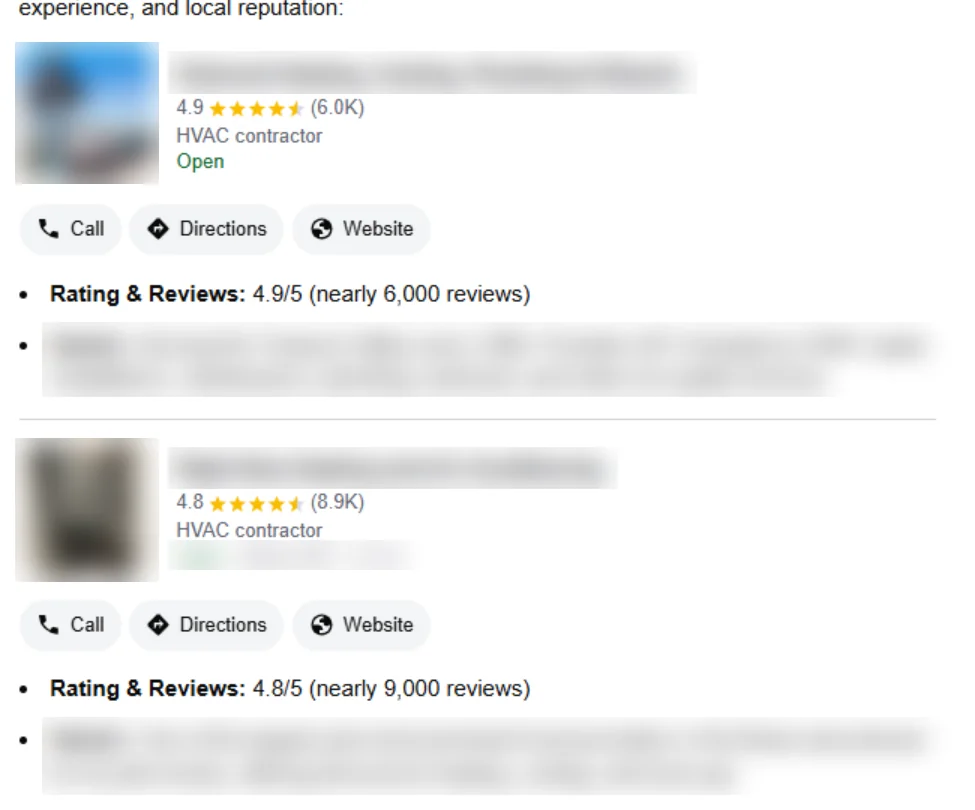
Google’s AI Overview for “Who is the best HVAC company in Boise, Idaho?” (October 2026). Business names and details blurred.
For the wider picture, see our guide on how to get your business discovered in AI search.
What does a monthly Business Profile routine look like?
Spend a little time every week on reviews and replies, then check hours, photos and services once a month and categories once a quarter. The routine below covers every field in this checklist without turning it into a second job.
Every week
- Reply to every new review, then check each reply went live rather than staying pending.
- Ask the week’s finished customers for a review, the same way every time.
Every month
- Upload a few new photos of real, recent work.
- Check your hours and set special hours for upcoming holidays and events.
- Look at your profile’s performance: calls, direction requests and website clicks.
- Publish a post if you have an offer, event or update customers need to know.
- Check for edits that Google or the public have suggested to your hours, category or phone number, and reject anything that’s wrong.
Every quarter
- Recheck your categories against the top three businesses in Maps for your main service.
- Reread your description and services list and update anything that has changed.
- Make sure your name, address, phone and hours match on your website, Bing Places, Apple Business, Yelp and Facebook.
What else do owners ask about Google Business Profile optimization?
Most of what owners type into Google about their profiles is about visibility, verification and the features Google has removed. Here are short answers to eight common questions owners search for.
What does Google Business Profile optimization actually do?
It helps Google match your business to more relevant searches and gives customers what they need to choose you, which shows up as more calls, direction requests and website visits. Google’s own guidance says complete, accurate profiles are more likely to appear in local results.
Why is my Google Business Profile not showing up in search?
Check five things in order: whether the profile is verified, whether your dashboard shows a suspension or review notice, whether you’ve just edited your name, address or category, whether your name, address and phone match your website and directories, and whether your categories and services match the search. If the profile appears when you search your exact business name but not for your services, the problem is usually relevance, distance or prominence rather than a technical fault.
Why is my Google Business Profile only visible to me?
Usually because verification isn’t finished. Google’s help pages note, for example, that photos and videos only show publicly after you verify your Business Profile. Check from a signed-out or private browser window to see what customers actually see.
How long does it take for a Google Business Profile to show up?
It shows publicly once verification is complete. Google says most postcard codes arrive within 14 days, and edits to a live profile can take a while to appear if Google reviews them first, so avoid stacking several changes at once.
Can I still add Q&A to my Google Business Profile?
Not as a public section. Google removed Q&A from Google Maps in late 2025; you can still answer existing questions from your profile, and the AI Ask button uses those answers and relevant reviews to reply to customers.
What size should Google Business Profile photos be?
Google recommends JPG or PNG files between 10 KB and 5 MB, at 720 x 720 pixels, with a minimum of 250 x 250 pixels.
Do keywords in my business name help my ranking?
Local SEO experts rank keywords in the name #3 in Whitespark’s survey, but only use them if they’re part of your real-world business name. Google’s guidelines don’t allow adding keywords to the name.
How often should I update my Google Business Profile?
Reply to reviews every week and check hours, photos and services every month. Posting frequency has little effect on rankings (#148 in Whitespark’s survey), so post when you have something customers need to know.
Want a second pair of eyes on your profile?
Around29 Digital Media Solutions reviews Business Profiles for small businesses across Tacoma, Puyallup, Auburn and the rest of Pierce County, and tells you which fields to fix first. Ask for a free local SEO check.
About the author: Mounika Sai Pasupuleti is an SEO and AI search strategist and the SEO Manager at Around29 Digital Media Solutions. With more than 3.5 years in SEO and marketing, Mounika builds strategies for technical SEO, content, local search and AEO/GEO, and tracks how AI tools are changing the way customers find businesses. Connect on LinkedIn.