Write your subject line and email preheader as a pair. If the subject says “Spring tune-up appointments are open,” the preheader can answer the next question with “See what’s included and choose a time online.” Together, they tell readers what the email is about and what they can do with it.
What an email preheader does
An email preheader is the short preview text many inboxes display next to or below the subject line. Email platforms often call the field “Preview text.” If you leave it blank, some inboxes pull the first text they can find in the message, which might be “View in browser” or part of the template. How much people see depends on the inbox, device, and settings. See Mailchimp’s guide to preview text.
Eight subject line and preheader examples
All examples in this guide are fictional. Each shows what the preview text can add while the subject stays the same.
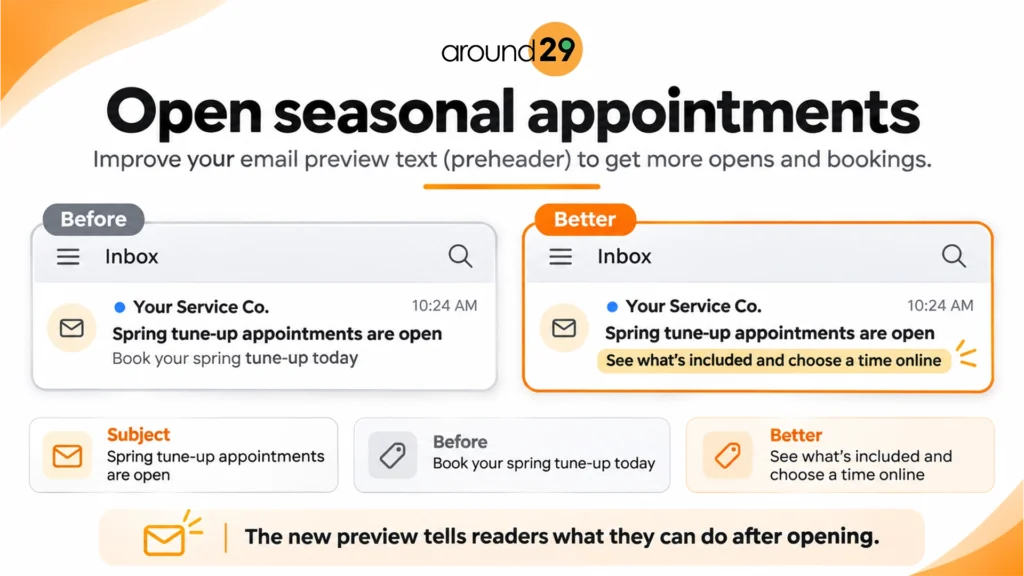
1. Open seasonal appointments
Subject: Spring tune-up appointments are open
Before: Book your spring tune-up today.
Better: See what’s included and choose a time online.
The new preview tells readers what they can do after opening. Use it when the email actually explains the service and links to scheduling.
2. Fill openings this week
Subject: Two haircut appointments opened this Friday
Before: We have openings this Friday!
Better: Pick the 11 a.m. or 2 p.m. slot while it’s available.
The specific times help readers decide whether to open. Check availability before sending and remove any implied urgency that your booking calendar can’t support.
3. Help a customer prepare for a visit
Subject: Your first visit is coming up
Before: We look forward to seeing you.
Better: Check where to park and what to bring.
Use the preview to point readers to the details they are likely to need first. Keep sensitive account or appointment information inside the appropriate secure channel.
4. Invite customers to come back
Subject: Is it time to book your next bike tune-up?
Before: We miss you!
Better: See what’s changed in our service menu since your last visit.
Give returning readers a concrete reason to look. Keep the message relevant to the audience you actually send it to.
5. Promote a holiday offer
Subject: Our Black Friday repair offer starts today
Before: Don’t miss our Black Friday offer.
Better: Book by Saturday and choose a December service date.
The preview answers a practical question about timing. Check that the deadline and eligible dates match the offer in the email. If you’re planning the full sequence, use our Black Friday email marketing calendar.
6. Share a seasonal tip
Subject: Get your gutters ready for the next storm
Before: Here are this month’s tips.
Better: Check downspouts and look for water pooling near the house.
A specific detail shows what readers will learn. This pairing works for a helpful email even when there’s no promotion or booking deadline.
7. Ask for feedback after a job
Subject: How did your appliance repair go?
Before: Tell us what you thought.
Better: Let us know if the repair solved the problem.
The stronger preview asks a question the customer can answer. It works best when the email makes it easy to respond and someone on the team can follow up.
8. Announce a change to business hours
Subject: Our holiday hours have changed
Before: Please review our updated hours.
Better: We’ll close early Friday and reopen Monday morning.
Put the change readers are most likely to need in the preview. Use the email body for exact hours, the location affected, and any exceptions.
Find the detail your subject line leaves open
Read your subject line as if it’s the only thing you know about the email. Write down the first question you’d have. If the subject announces appointments, you might want to know when they’re available. If it promotes an offer, you might look for the deadline or what’s included. If it shares advice, you might want one example of what you’ll learn.
Try drafting two versions of the preheader. One can focus on what the reader gets, and the other can focus on what they need to do. For a guide to preparing for a home inspection, you might lead with “See which rooms to clear before the visit” or “Use the checklist before your inspector arrives.” Choose the one that best matches the email’s goal and the link inside it.
When a message includes a deadline, decide which part of the pair should carry it. If missing the deadline would make the email irrelevant, put it early where readers are likely to see it. If readers need to understand the offer first, explain that in the subject and use the preview for timing.
Write and test the pair before you send
- Start with the point of the email. Use the subject line for the main idea and the preheader for a detail the subject leaves open, such as what’s included, when it ends, or how to take the next step.
- Put the most useful words first. Preview space varies. “Book by Saturday” carries the message even if the rest of the line is cut off.
- Check the actual inbox. Enter the copy in the preview text field, send a test, and look at it in the inbox list on a phone and on a desktop. Check the subject and preview together for cutoffs, repeated wording, template text, and any personalization placeholders. Then open the email and make sure it delivers what both lines promise. See Mailchimp’s email testing tips.
If your test still shows “View in browser,” check that you saved the text in the campaign’s preview field. The line at the top of the opened email may be a separate part of the template. Send a fresh test after editing and view the message in the inbox list again. If one inbox still pulls content from the email body, review the first visible line of the template so it reads naturally as a fallback.
If you compare two preheaders in a campaign, keep the subject line and email body the same so the preview is the change you’re testing. Pick the outcome you care about before sending, such as clicks to the booking page for a scheduling email. Save the subject and preview together in your notes so you can reuse the pattern with a similar audience.
If you’d like help planning and reviewing email campaigns, see our email marketing services.